 ng-xtend Framework ng-xtend Framework
Empower your Angular applications with a flexible, scalable plugin ecosystem! 🚀

The most successful web platforms—like WordPress, Nextcloud, or Drupal—thrive because of their massive plugin ecosystems. They make it effortless to extend functionality without touching the core.
In the Angular & TypeScript world, achieving this level of modularity has always been a challenge. ng-xtend was built to bridge that gap. It allows you to build “extensible by design” applications where external teams can contribute features seamlessly.
ng-xtend is an Angular library that enables you to:
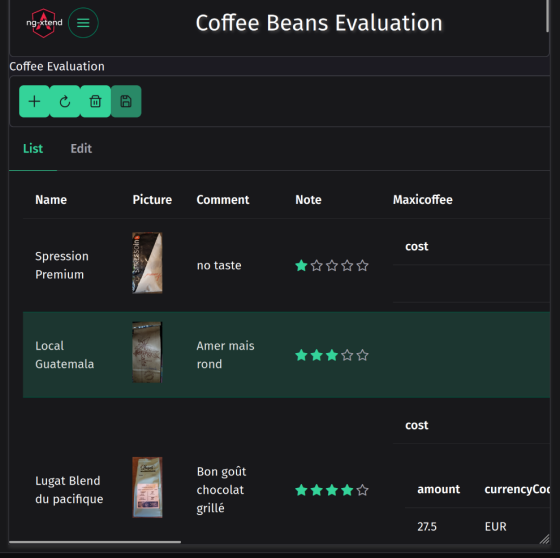
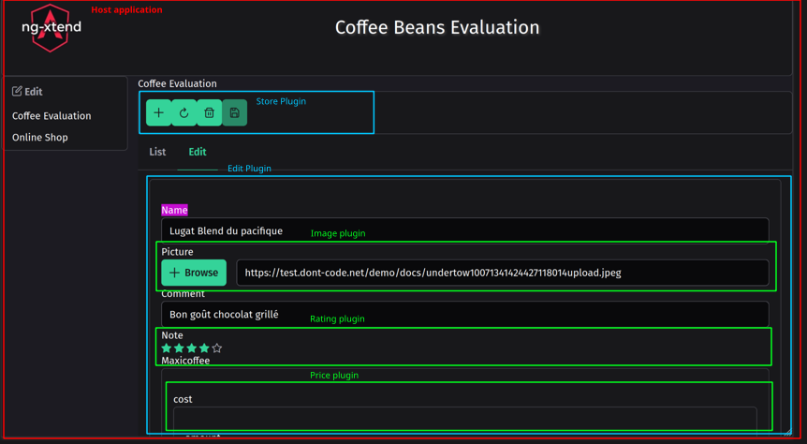
A real-world example of an app handling complex data (lists, views, and editions) entirely through dynamic plugins.
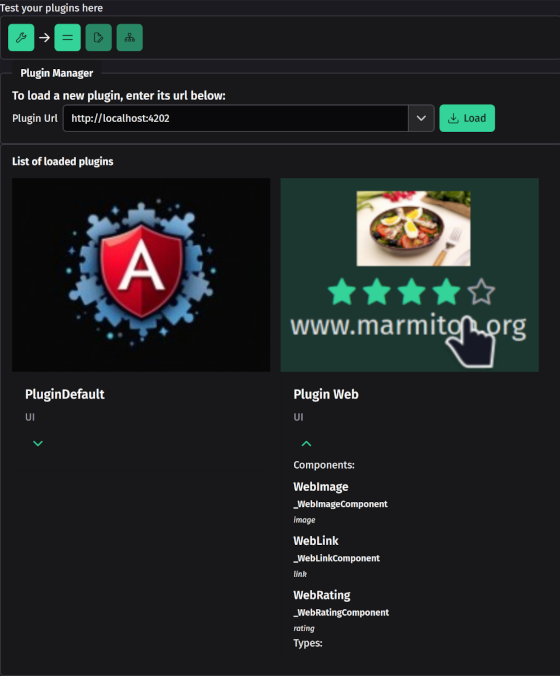
Curious about how plugins are dynamically injected? Try the dedicated tester:
Currently, ng-xtend supports four major extension points:
| Type | Description |
|---|---|
| Simple Components | Turn regular Angular components into pluggable units for specific data types. |
| Complex Components | Components that provide their own extension points. Example: A “Money” plugin delegating “Currency” selection to another plugin. |
| List Components | Effortlessly display collections of objects by delegating item rendering to the right plugins. |
| Action Handlers ✨ | Add logic and actionable buttons to your UI dynamically. |
The host application doesn’t need to know its plugins at compile
time. It simply sets Render Points
(xt-render):
Rating, Currency), it
automatically finds and injects the correct component from the loaded
plugins.We use a monorepo structure powered by Rush.
npm install -g @microsoft/rush
rush update
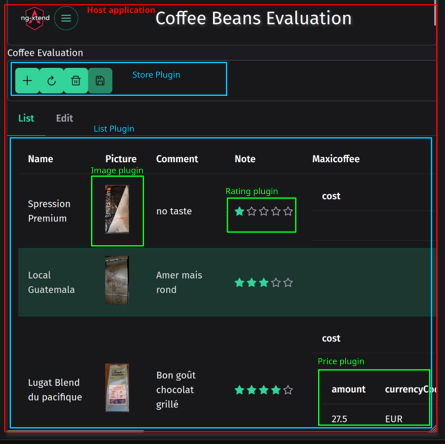
rush buildHere are screenshots of an application automatically handling list,
view and edition of complex data (evaluations of coffee beans) using
ng-xtend, a dont-code
application, and the default
plugin and web
plugin
You can see how the different plugins work together without knowing each
other. Even the host application does not know them.
    npm install -g @microsoft/rush
    rush update
rush buildng serve sample-tester for the sample pluginng serve plugin-tester in
xt-plugin-tester directoryTo use ng-xtend plugins in your own Angular Application, xt-host project is a great example. It does:
    npm install xt-components xt-type xt-store
npm install xt-plugin-default protected resolverService = inject (XtResolverService);
this.resolverService.loadPlugin(url);The plugins will register themselves automatically. this.resolverService.registerTypes ({
money:{
amount:'number',
currency:'currency' /** Type provided by the finance plugin **/
},
book: {
name:'string',
publication:'date',
price:'money',
notation:'rating' /** Type provided by the web plugin **/
}
}); <h1>List of books</h1>
<xt-render [displayMode]="LIST_VIEW" [valueType]="book" [value]="listOfBooks" ></xt-render> - or allow editing a book information <h1>Enter your book details</h1>
<div form="bookForm">
<xt-render [displayMode]="FULL_EDITABLE" [valueType]="book" [formGroup]="bookForm" subName="book"></xt-render>
</div> - To support more complex scenario, use <xt-render-sub [context]="context()"></xt-render-sub>with `context ()` returning type information necessary to select the right component.Please check my other project Dont-code, it will soon run using ng-xtend ! Email: contact@ng-xtend.dev or developer@dont-code.net
